
When you compare annual vs monthly SaaS pricing, the annual plan is worth it only if you will keep using the tool longer than its break-even point. Divide the annual price by the monthly price to get that point in months. A typical “2 months free” offer breaks even at 10 months. If there is a real chance you will switch or cancel before then, monthly billing is cheaper and safer.
- Break-even months = annual price divided by monthly price.
- A 16.7% annual discount (“2 months free”) needs 10 months of real use to pay off.
- Black Friday deals often discount only the first year. Always check the renewal price.
- Seat minimums, no-refund policies and auto-renewal can wipe out the discount.
- Pay annually only for tools your team already uses every week.
Late November is when software companies push their biggest annual-plan discounts. The banners look generous: 40% off, two months free, lock in this price forever. Some of these offers are excellent. Others quietly commit you to a tool you will stop using by March. This guide gives you a simple formula, a calculator, and a checklist so you can tell the difference in a couple of minutes.
Annual vs monthly SaaS billing: what is the real difference?
With monthly billing, you pay a higher price per month but can cancel at the end of any month. With annual billing, you pay for 12 months upfront at a lower effective monthly rate, and in most cases you cannot get money back if you stop using the tool early. You are trading flexibility for a discount.
That trade only makes sense when you are confident about three things: you will keep the tool for the full year, your team size will not shrink, and the tool will still fit your workflow in twelve months.
The break-even formula for annual vs monthly SaaS pricing
Here is the one calculation that matters:
Break-even months = Annual price ÷ Monthly price
If a tool costs $30 per month or $300 per year, the break-even point is 300 ÷ 30 = 10 months. If you use it for 10 months or more, the annual plan wins. If you stop after 6 months, you paid $300 for something that would have cost $180 on monthly billing.
Break-even point by discount level
| Annual discount | How vendors often describe it | Break-even point | Verdict |
|---|---|---|---|
| 10% | “Save 10%” | 10.8 months | Rarely worth the lock-in |
| 15% | “Save 15%” | 10.2 months | Only for tools you depend on daily |
| 16.7% | “2 months free” | 10.0 months | Good for established tools |
| 20% | “Save 20%” | 9.6 months | Good for established tools |
| 25% | “3 months free” | 9.0 months | Strong if usage is steady |
| 30% | Seasonal sale | 8.4 months | Strong, check the renewal price |
| 40% | Black Friday offer | 7.2 months | Very strong, if it renews at a fair rate |
| 50% | Launch or holiday deal | 6.0 months | Excellent, unless the product is unproven |
Annual SaaS break-even calculator
Enter the prices from the vendor’s pricing page and how many months you realistically expect to use the tool. The calculator runs in your browser and does not store anything.
Is the annual plan worth it?
Four scenarios that show the real risk
Using the same example of $30 per month or $300 per year for one seat, here is what you pay in four common situations:
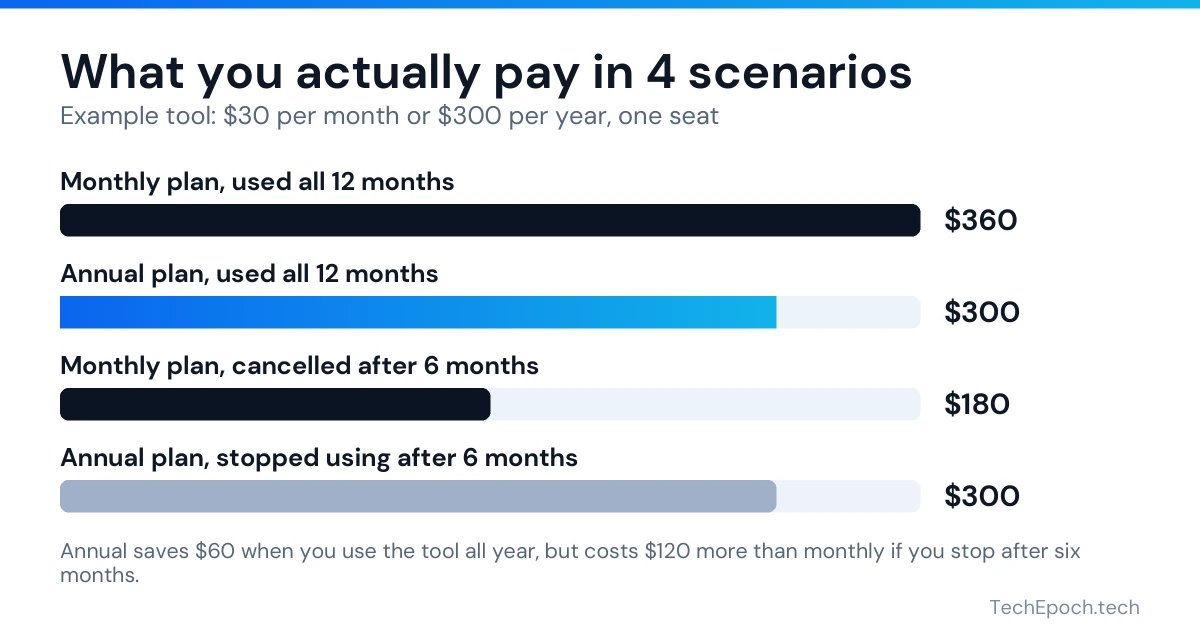
The annual plan saves $60 if everything goes to plan. If you stop at month six, it costs you $120 more than monthly billing would have. In other words, the downside of a wrong annual commitment is often twice the size of the upside. That is why the decision should be based on evidence of real usage, not on how big the discount banner looks.
When annual billing makes sense
- The tool is already part of daily work. Email, accounting, password management, your CRM. If removing it tomorrow would cause problems, you will almost certainly use it all year.
- You have at least three months of usage history. Look at logins and active users, not just whether you are paying.
- Your team size is stable. Annual plans often let you add seats but not remove them until renewal.
- The renewal price is reasonable. A discount that only applies to year one is a trial with a long commitment.
- The vendor is established. A year upfront to a very young product carries extra risk if it shuts down or pivots.
When monthly billing is smarter
- You are still testing whether the tool fits your workflow.
- The project or client that needs the tool may end within the year.
- You expect to switch tools after a planned migration, for example moving from a spreadsheet to a CRM.
- Cash flow matters more than a small saving. Paying 12 months upfront ties up money you might need elsewhere.
- The tool is in a fast-moving category, like AI writing or meeting assistants, where a better option may appear within months.
Comparing several tools at once?
Use our no-regret checklist to compare workflow fit, security, integrations, total cost and exit options before you pay for anything.
Black Friday SaaS deals: 6 traps to check
| Trap | What it looks like | What to check |
|---|---|---|
| First-year-only discount | “60% off” in large print | The renewal price and whether you will be reminded before renewal |
| Seat minimums | “From $8 per user” | Whether the deal requires 3, 5 or 10 seats |
| No refunds or proration | Small print in the terms | Refund window and whether unused months are credited |
| Feature-limited plan | Big discount on a lower tier | That the discounted tier includes the features you actually need |
| Auto-upgrade at renewal | Plan moves to a new tier next year | The plan name and price you will be renewed on |
| Lifetime deals | Pay once, use forever | The vendor’s age, funding and data export options |
Worked example: a 60% first-year discount
Suppose a tool lists at $300 per year or $30 per month, and a Black Friday offer gives 60% off the first year, so year one costs $120. Year two renews at the normal $300.
- Two years on the deal: $120 + $300 = $420.
- Two years on monthly billing: $30 × 24 = $720.
- Two years on normal annual billing: $300 × 2 = $600.
In this case, the deal is genuinely good, as long as you will still use the tool in year two. If you would have cancelled after six months anyway, monthly billing would have cost only $180.
Checklist before you click “Pay annually”
- Check usage: who logged in during the last 30 days, and how often?
- Calculate the break-even point and compare it with your realistic usage period.
- Read the renewal terms: date, price, and how you will be notified.
- Confirm whether you can reduce seats or downgrade during the year.
- Look for a refund window or pro-rated credit policy.
- Make sure you can export your data in a usable format if you leave.
- Add the renewal date to your calendar 30 days early, so you can decide in time.
If the tool stores customer data, also check where it is hosted and who can access it. Our comparison of SaaS vs on-premise software explains the trade-offs in control, security and cost.
Frequently asked questions
Is annual billing always cheaper than monthly?
Only if you use the tool past the break-even point. If you cancel early, annual billing usually costs more because unused months are rarely refunded.
What does “2 months free” mean as a percentage?
It means you pay for 10 months and get 12, which is a discount of about 16.7%. The break-even point is 10 months.
Can I get a refund if I cancel an annual SaaS plan early?
It depends on the vendor. Many offer no refunds after a short window, while some give pro-rated credit. Always read the refund and cancellation terms before paying.
Are Black Friday SaaS deals worth it?
They can be, especially for tools you already rely on. Check whether the discount applies only to the first year, what the renewal price is, and whether there are seat minimums.
Should a small business pay annually for AI tools?
Be careful. AI tools change quickly and new options appear often. Unless the tool is already central to daily work, monthly billing keeps your options open.