
Written November 19, 2026. Businesses in ChatGPT is a beta, so screens and rules may change. When in doubt, follow OpenAI’s official setup guide.
To claim your business in ChatGPT, sign in with an account your business controls, open ChatGPT Business Hub from the sidebar (or chatgpt.com/business-hub), find your business, and verify it by business phone, business email, website domain or Shopify. After OpenAI approves the claim, complete Persona identity verification to edit details, add a product feed and see insights. Claiming is free during the beta.
- OpenAI launched Businesses in ChatGPT in beta on November 10, 2026.
- You do not need an Ads account or a ChatGPT Enterprise plan to claim a business.
- Claiming a profile lets you correct facts and see mentions and clicks. It does not guarantee ChatGPT will recommend you.
- Business Agents are limited to eligible U.S. ecommerce and online-service businesses for now.
- Businesses never see users’ private ChatGPT conversations, only aggregated insights.
People already ask ChatGPT which accounting firm, web designer or online store they should use. Until now, a business had no direct way to fix what ChatGPT said about it. Business Hub changes that. This guide walks through every step, explains which verification method to choose, and covers the problems people are hitting in the first weeks of the beta.
What is ChatGPT Business Hub?
Business Hub is the dashboard inside ChatGPT where a business owner or authorized representative can claim a business profile, keep its details current, connect product information, and view aggregated insights about how people find the business in ChatGPT. It is part of a beta program called Businesses in ChatGPT, which OpenAI introduced on November 10, 2026, alongside a second feature called Business Agents.
OpenAI says ChatGPT reaches about 1.2 billion people each week. That is total platform usage, not the number of people who will see your profile, but it shows why a correct listing matters.
The three parts of Businesses in ChatGPT
| Part | What it does | Who can use it (beta) |
|---|---|---|
| Business Hub (profile) | Claim and verify your business, update key details, connect a product feed | Eligible businesses in markets where ChatGPT and the required verification are available |
| Insights | Aggregated activity for the past 28 days, such as mentions and website clicks | Approved claims that have completed Persona verification |
| Business Agent | A labelled chat that answers customer questions using information you provide | Eligible ecommerce and online-service businesses in the United States |
Who can claim a business in ChatGPT?
You can claim a business if you own it or are authorized to represent it. You need a ChatGPT account, but not an advertising account or an Enterprise agreement. A few rules are worth knowing before you start:
- Online businesses that cannot find themselves may see an option to add a new listing.
- Local stores and restaurants can currently claim only an existing U.S. listing.
- Multi-location brands claim the brand and each location separately. There is no central management for locations yet.
- OpenAI Enterprise customers and advertisers can ask their OpenAI representative to help with the claim.
- Shopify merchants can connect through Business Hub or from the Shopify admin.
Before you start: a 5-minute checklist
- Use a ChatGPT account the business controls, not a personal account you might lose access to. You can add teammates later.
- Have access to at least one of these: the phone number listed for the business, an email address on your business domain, your domain’s DNS settings, or your Shopify admin.
- Keep a government ID ready for Persona identity verification.
- Write a clean, current description of your business, your main services or products, and your policies (shipping, returns, booking). You will need it after approval.
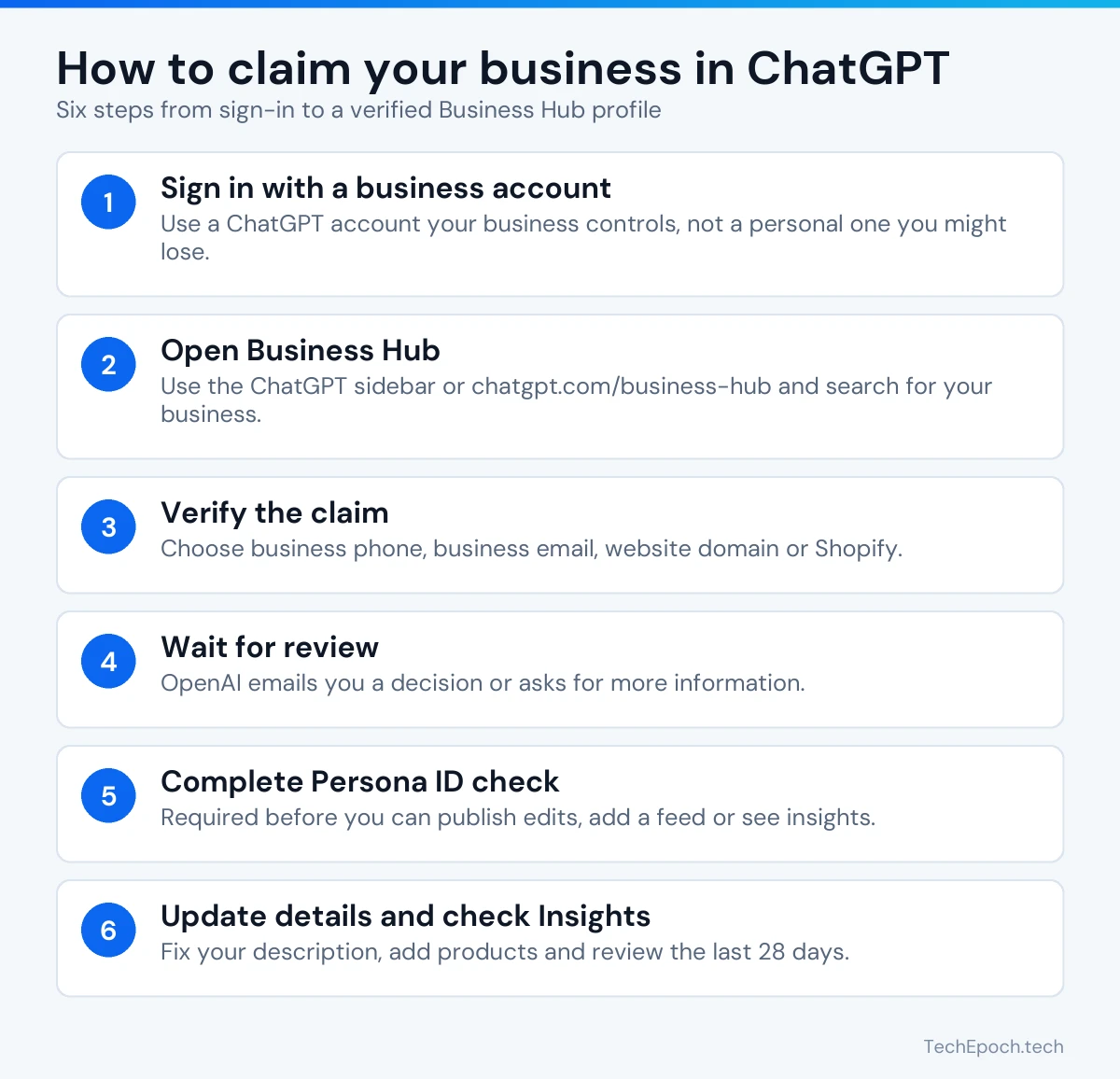
How to claim your business in ChatGPT, step by step
Step 1: Sign in with the right account
Log in to ChatGPT with the account you want to manage the business from. Using a shared or role-based account avoids problems if an employee leaves.
Step 2: Open Business Hub and find your business
Open Business Hub from the ChatGPT sidebar, or go to chatgpt.com/business-hub. Search for your business by name. If it appears, select it and start a claim. If your listing shows Contact support, it is locked, and you will need to request access through that button.
Step 3: Verify that the business is yours
ChatGPT offers one or more verification methods depending on your business. Pick the one you can complete fastest (see the comparison table below). If you choose the website domain option, add the DNS record you are given at your domain provider, then return to ChatGPT and select Verify domain.
Step 4: Wait for OpenAI’s review
OpenAI reviews each claim and emails you a decision or a request for more information. While a claim is under review, you can cancel it if you made a mistake.
Step 5: Complete Persona identity verification
An approved claim gets you into Business Hub, but you still need to verify your identity with Persona before you can publish changes, connect a product feed, view insights, or create a Business Agent. Open the Business tab, select your profile, and follow the prompt to complete verification.
Step 6: Update your details and check Insights
Correct your description, contact details and key facts. If you sell products, connect a product feed with pricing and availability. Then open Insights to see activity for the past 28 days.
Which verification method should you choose?
| Method | Best for | What you need | Watch out for |
|---|---|---|---|
| Business phone | Local businesses with a listed phone number | Access to the phone number shown on the listing | The number must match the listing exactly |
| Business email | Companies with email on their own domain | An inbox like name@yourbusiness.com | Free email addresses (Gmail, Outlook) may not count as business email |
| Website domain | Online businesses, agencies, SaaS | Access to DNS settings at your domain provider | DNS changes can take time to appear |
| Shopify | Shopify stores | Admin access to the Shopify store | Only available for Shopify-based businesses |
Thinking about AI agents for your business?
Business Agents are just one kind of AI agent. Learn what agents can safely automate for a small business, and where a human should stay in control.
What can you see in ChatGPT Business Hub insights?
Insights show aggregate activity over the past 28 days. The main numbers are:
- Mentions: how often ChatGPT referred to your business in answers.
- Website clicks: how often people clicked through to your site from ChatGPT.
- Discovery topics: the kinds of questions where your business came up.
Two limits are important. First, OpenAI does not share users’ private conversations or their chats with your Business Agent. Second, insights appear only once activity passes certain thresholds, so a small business may see little or no data at first. That is normal and not a sign that something is broken.
What are ChatGPT Business Agents?
A Business Agent is a clearly labelled chat inside ChatGPT that speaks for your business. It answers customer questions using the product and policy information you supply and the guidelines you set. Customers can only chat with an agent after you publish it.
During the beta, agents are available to eligible ecommerce and online-service businesses in the United States, and they are free at launch. OpenAI has not ruled out charging later. If you qualify, keep your first agent narrow: product questions, shipping, returns and booking. Test it with real customer questions before you publish.
ChatGPT Business Hub vs Google Business Profile
| Feature | ChatGPT Business Hub | Google Business Profile |
|---|---|---|
| Where it shows | ChatGPT answers and business profiles | Google Search and Google Maps |
| Status | Beta (launched November 2026) | Established product |
| Cost | Free at launch | Free |
| Verification | Phone, business email, domain or Shopify, plus Persona ID check | Video, phone, email or other methods depending on business |
| Analytics | Mentions, website clicks, discovery topics (28 days) | Searches, views, calls, direction requests, website clicks |
| Customer chat | Business Agent (eligible U.S. businesses) | Google retired Business Profile chat in 2024 |
Common problems and fixes
| Problem | Likely cause | Fix |
|---|---|---|
| Your business does not appear in search | No existing listing, or you are a local business outside the U.S. | Online businesses can try the add option. Otherwise wait for wider rollout. |
| Listing shows Contact support | The listing is locked or already claimed | Use Contact support to request access or dispute ownership. |
| Domain verification fails | DNS record not live yet or added to the wrong host | Check the record at your DNS provider, wait, then select Verify domain again. |
| Edits do not show in ChatGPT answers | Changes are reviewed, and ChatGPT also uses other sources | Allow time, and make sure your website and other listings show the same facts. |
| Insights are empty | Activity has not reached the reporting threshold | Keep your profile accurate and check again later. |
How to make ChatGPT describe your business accurately
A claimed profile helps, but ChatGPT may still use information from your website and other sources when it answers questions. Make the facts consistent everywhere:
- Use the same business name, address, phone number and service list on your website, Google Business Profile and social profiles.
- Put a short, factual “what we do” paragraph near the top of your homepage and About page.
- Publish clear policy pages (pricing, shipping, returns, booking) in plain language.
- Answer common customer questions on your site. Clear question-and-answer content is easier for AI systems to quote correctly.
If you want to go further, our guide on how to use AI for SEO covers how to structure content that both search engines and AI assistants can understand.
Frequently asked questions
Is ChatGPT Business Hub free?
Yes. Claiming a profile and publishing a Business Agent are free at launch. OpenAI has said a paid model could come later.
Do I need ChatGPT Plus or Enterprise to claim my business?
No. A regular ChatGPT account is enough. You do not need an Ads account or an Enterprise agreement.
Will claiming my business make ChatGPT recommend it more?
Not directly. A verified profile lets you correct information and see insights, but it does not guarantee recommendations or placement.
Can a business in Pakistan, India or the UK claim a profile?
Businesses in markets where ChatGPT is available can claim a profile if verification is supported for them. Local stores and restaurants are currently limited to existing U.S. listings, and Business Agents are U.S.-only during the beta.
Can I see what customers asked about my business?
No. OpenAI shares only aggregated insights such as mentions, clicks and discovery topics, not individual conversations.