
Written on November 19, 2026, while the rollout was still in progress. Check the Google Search Status Dashboard for the latest status.
The Google November 2026 core update began rolling out on November 10, 2026, applies to all countries and languages, and can take up to two weeks to finish. Do not change your site during the rollout. Wait until Google marks it complete, give it one more full week, then compare that week with the week before November 10 in Search Console.
- This is the third broad core update of 2026, after the March and May updates.
- Rankings often swing in waves during a rollout, so early data is misleading.
- A small dip usually needs no action. A large, site-wide drop needs an honest content review.
- Quick fixes such as deleting sections or rewriting titles in bulk rarely help and can make things worse.
- Recovery can take months, but improvements can also show up between big updates.
If your traffic graph started looking strange in mid-November, you are not alone. A core update is the moment many small site owners panic and start changing things. This guide shows you what to check, in what order, and what to leave alone, so you make decisions based on clean data instead of daily noise.
What is the Google November 2026 core update?
A core update is a broad change to the systems Google uses to rank pages. It is not aimed at one type of website or one tactic. Google released the November 2026 core update on November 10, 2026, at about 10:06 a.m. Pacific time and posted it on the Search Status Dashboard with a short note: “The rollout may take up to 2 weeks to complete.” It applies globally and to all languages.
Google described it as a regular update meant to surface relevant, satisfying content from all types of sites. As usual, it did not publish a list of specific changes. That means any article claiming to know exactly what this update “targets” is guessing.
How it compares with earlier 2026 core updates
| Update | Started | Completed | Rollout length |
|---|---|---|---|
| March 2026 core update | March 27, 2026 | April 8, 2026 | About 12 days |
| May 2026 core update | Late May 2026 | June 2, 2026 | Just under 12 days |
| November 2026 core update | November 10, 2026 | In progress when written | Up to 2 weeks (Google estimate) |
Past rollouts have also run longer than two weeks. The December 2025 core update took just over 18 days. So treat “up to two weeks” as an estimate, not a deadline.
Should you change anything during the rollout?
No. During a rollout, rankings can rise on Monday and fall on Thursday for the same page. If you rewrite content in the middle of that movement, you will never know whether the update or your edit caused the result. The safest move for a small website is to keep publishing as normal, avoid big structural changes, and simply record what you see.
Write down three things in a simple note or spreadsheet:
- The date you first noticed a change.
- The pages that moved the most (up or down).
- Anything else that changed on your site in the same period, such as a redesign, a plugin update, or a hosting move.
That last point matters. Many “core update drops” turn out to be a broken sitemap, a noindex tag left on by mistake, or a slow server.
The 6-step check after the rollout ends
This process follows Google’s own guidance on core updates, turned into a checklist you can actually run in an afternoon.
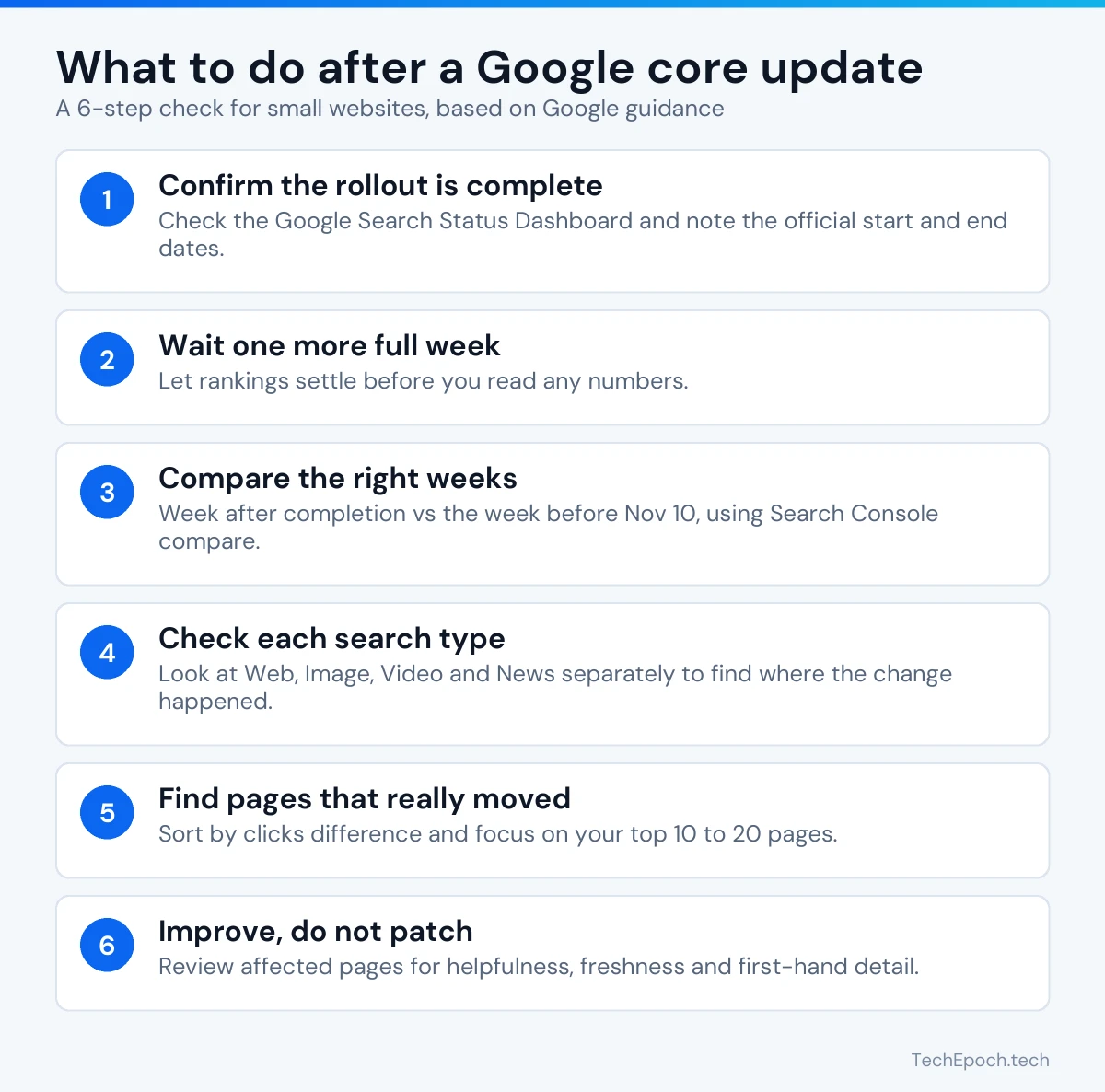
- Confirm the rollout is complete. Open the Search Status Dashboard and note the official start and end dates. Do not analyze before the end date appears.
- Wait one more full week. Google recommends giving it at least a week after completion so the data settles.
- Compare the right weeks. In Search Console, compare the first full week after completion with the week before the rollout began (November 3 to 9, 2026).
- Check search types separately. Switch between Web, Image, Video and News in the Performance report. A drop in Images alone is a very different problem from a drop in Web.
- Find the pages and queries that moved. Sort by clicks difference. Focus on your top 10 to 20 pages, not every small fluctuation.
- Review only the pages that really lost ground. Read them as a first-time visitor would, then compare them with the pages that now rank above you.
How to set up the date comparison in Search Console
Here is a worked example. Suppose Google marks the rollout complete on November 24, 2026. Your comparison would look like this:
| Step | Date range | Why |
|---|---|---|
| Baseline week (before) | Nov 3 to Nov 9, 2026 | The last full week before the rollout started on Nov 10. |
| Waiting period | Nov 25 to Dec 1, 2026 | One full week after completion, as Google suggests. |
| Comparison week (after) | Dec 2 to Dec 8, 2026 | A clean week with no rollout movement. |
In Search Console, open Performance > Search results, click the date filter, choose Compare, and enter the two custom ranges. Use the same weekday span for both so weekend patterns do not distort the result.
Small drop or large drop: what to do next
| What you see | Likely meaning | What to do |
|---|---|---|
| Clicks down less than about 10 to 15%, spread across many pages | Normal movement after a ranking recalculation | No drastic action. Keep publishing and improving your best pages. |
| A few pages lost a lot, the rest are stable | Other pages now answer those queries better | Review those specific pages against the questions in the next section. |
| Large, sustained drop across most of the site | Google’s systems see the site as less helpful overall | Run a full site assessment. Consider which sections exist mainly for search traffic. |
| Drop started before Nov 10 or on a different date | Probably not the core update | Check technical issues: indexing, robots.txt, sitemap, speed, recent site changes. |
Want a full checklist for your site?
Our free 12-point SEO audit walks you through indexing, titles, internal links, images and speed without paid tools.
Questions to ask about pages that lost traffic
Google suggests assessing affected pages against its people-first content questions. Here is a practical version for small business and tech blogs:
- Does the page answer the question in the first few lines? If a reader has to scroll past a long introduction, a competitor that answers immediately will win.
- Does it show first-hand experience? Screenshots you took, prices you checked, results you measured. Generic summaries of other articles are easy to replace.
- Is the information still current? Free plan limits, prices and features change often. An outdated comparison loses trust quickly.
- Would you bookmark it or send it to a colleague? If the honest answer is no, it probably needs a deeper rewrite, not a new keyword.
- Is it clear who wrote it and why they are qualified? An author name, a short bio and links to sources all help readers and search engines trust the page.
It also helps to ask someone who does not work on the site to read your most affected pages and the pages now ranking above them. An outside reader spots gaps you have become blind to.
What not to do after a core update
- Do not delete content in bulk. Google treats deletion as a last resort. Remove pages only if whole sections clearly exist for search engines rather than people.
- Do not chase “quick fixes”. Removing page elements, stuffing keywords into headings or changing every title at once is not a sustainable improvement.
- Do not copy whatever ranks first. Make your page more useful in your own way: clearer steps, better examples, fresher data.
- Do not judge on one day of data. Weekly comparisons beat daily panic.
How long does recovery take?
There is no fixed timeline. According to Google, some improvements can be reflected within days, but its systems may need several months to confirm that a site consistently produces helpful content. If several months pass with no change, the next core update may be the next real opportunity. Google also runs smaller core updates that it does not announce, so genuine improvements can show results between the big ones.
For a small site, the practical plan is simple: fix the pages that matter most, keep publishing genuinely useful content, and review your numbers monthly rather than daily. If you are building topical depth, our guide to building SEO topic clusters shows how to connect related pages so they support each other.
Frequently asked questions
When did the Google November 2026 core update start?
It started on November 10, 2026, at about 10:06 a.m. Pacific time, according to the Google Search Status Dashboard.
How long will the November 2026 core update take?
Google estimated up to two weeks. Earlier 2026 core updates finished in about 12 days, while the December 2025 update took just over 18 days.
Is my site being penalized if traffic dropped?
Not necessarily. A core update is not a manual penalty. It means Google re-evaluated which pages best answer each query. Check the Manual actions report in Search Console to rule out a penalty.
Should I update old posts during the rollout?
Routine updates are fine, but avoid large rewrites or site-wide changes until the rollout is complete and you have compared clean weekly data.
Can AI Overviews explain a traffic drop after a core update?
Sometimes. If impressions held steady or rose but clicks fell, more answers may be shown directly in AI Overviews or AI Mode. Check the generative AI report in Search Console for the same period.